How can I communicate with other members?
There are different ways to communicate with your friends and other members on TastyKitchen.com:
Write a review
You can communicate in the general forum by writing your question in the Review dialog box of a particular recipe and sending it to the author. To find the Review dialog box, click on the link to the recipe you would like to Review. At the bottom of that page there is a blank form or dialog box where you can write your review or ask your question. When you are done writing the review, just click Submit and your note to the author will be on its way through the general forum.
Post to their Wire
You can also correspond with a member by posting directly on their Wire once you are connected as a friend. You can find your list of Friends by looking on the left side of your Profile page and clicking Friends. Once you are inside your Friends list, just click the link for the member for whom you want to leave a Wire post. (Alternatively, you can use any one of the other ways to access your friend’s Profile page. See below for a list of the different options available to you.) Once you are on their Profile page, scroll down to the dialog box, write your note, and click Post. Your note will be posted on your friend’s Wire. You can see notes that your friends have written to you under Wire (which you will find on the left side menu of your Profile page). Please note that Wire posts are visible to the public.
Send a private message
If you want to send your friend a private message, you can do so by clicking on the Send Message button on the left menu bar of your friend’s Profile page. Or you could also simply click the Compose Message button on the left menu bar of your own Profile page, and enter your friend’s exact username. These messages are private, and will be seen only by the friend(s) that you send it to.
Please remember to set your preferences/permissions for email notifications. You can do this from your Profile page, under the Notifications section. Click Yes if you want us to notify you when you get new friend requests, friendship acceptances, posts to your wire, etc.
Back to the main FAQs page
Bring on the friends! How can I request a friend? How do I approve a friendship request?
In order to connect as a friend, just head to the member’s Profile page. There are different ways you can do this:
- Click on Members either on the top navigation bar or the green area in the left menu bar. This will take you to the Member search area, where you can search for the member. Be sure to use the member’s precise username.
- Click on the member’s name from any of their recipe pages.
- Click on the member’s name on any review or wire post that they’ve written.
Once you find the member’s Profile page, on the left menu bar, you will see a green button that reads Add a Friend. Click Add a Friend and your request will be sent to the member. Now all you have to do is wait for them to accept your invitation! Once they have accepted your invitation, you’ll get a notification via e-mail (if you’ve chosen to receive email notifications). Then you will be able to communicate directly with the member.
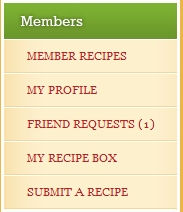 Approving a friendship request is easy peasy. Head over to your Profile page, and on the left menu bar, you will see a button that reads Friend Requests. A number next to it means that there are requests waiting for you! Click on the Friend Requests button, and you will see the list of pending requests. Click on the button with the plus sign to accept the friendship request, or the minus sign to reject the request. That’s all that there is to it!